Can the server you SSH into read your screen?
If you SSH from Git Bash, WezTerm or Debian's xterm, the server can read what's on your screen, even a file you'd already closed. Here's how to check yours.
- Published
- Reading time
- 3 min
- Tags
- Share
If you’re using Git Bash, WezTerm or the xterm that comes with Debian or Ubuntu 24.04, then yes, it can. Any server you SSH into can read what was on your screen before you connected, and the last file you had open in nano or vim, without you typing a thing.
Here’s a Debian server doing it to Git Bash. The secrets are fake, and everything under the first ssh line is what the server read back:
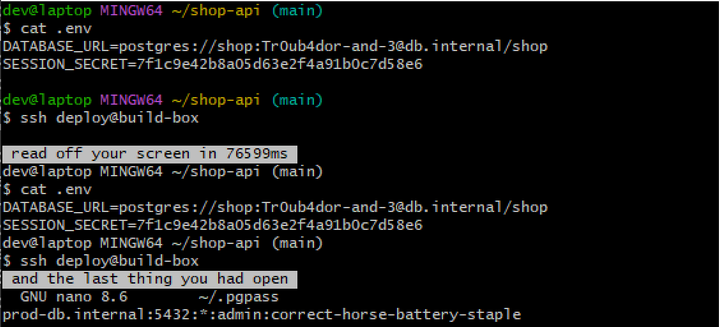
Git Bash’s own window on Windows, SSHing into a Debian box on 4 November.
- 6.3m downloads of the Git for Windows installer since 28 September, and Git Bash opens in this window unless you pick otherwise
- 77s for a 50-line bash script to read a whole screen over SSH
- 0 settings in Git Bash’s window that turn it off
What’s going on
Terminals understand special codes that programs print to change colours or move the cursor. One of them, from DEC’s old VT420 terminals, asks the terminal to add up the characters in a box on the screen and send back the total. It’s meant for test suites, so they can check the terminal drew things properly.
But if the box is one character big, the total is just that character. So a program can ask about each spot on the screen in turn and rebuild the whole thing. Over SSH, the question travels down to your terminal like any other output, and the terminal’s reply goes back up as though you’d typed it.
nano and vim also draw on a second, hidden screen, which stays in memory after you quit, and clear doesn’t wipe it. The server can switch to that screen and read it too, which is how it got the .pgpass in the picture. You’d see your old file come back up while it’s being read, and that’s the only sign.
How it got here
- 2018 xterm puts the code on its list of “dangerous” features that are switched off. Debian builds xterm with an older list of its own, so it’s still on in Debian 12, Debian 13 and Ubuntu 24.04.
- 2019 WezTerm, and then mintty (the window Git Bash opens in), add the code so they can pass a terminal test suite.
- 2023 dgl writes up this exact attack: reading someone’s screen as they SSH in.
- 2024 WezTerm’s last stable release comes out, with the code still on. Homebrew, Scoop and Chocolatey still install that one.
- 2026 WezTerm switches it off in March, but only in nightly builds. Git Bash still does it.
Why it matters
It’s only a problem with servers you don’t fully trust. But that’s a long list: a shared box, a client’s server, or anything that’s been broken into, where an attacker can just wait for the next person to log in. And what they get comes from your laptop, not the server: the tokens, passwords and config files you had on screen before you connected.
Checking yours
Here’s who does it:
I tested the first three over SSH on 4 November. The rest are from each project’s source code.
| Terminal | Can it? |
|---|---|
| Git Bash (mintty), also MSYS2, Cygwin and WSLtty | Yes |
| WezTerm 20240203, the stable release | Yes |
| xterm on Debian 12 and 13, Ubuntu 24.04 | Yes |
| WezTerm nightly | No |
| xterm anywhere else | No |
| Windows Terminal | No |
| iTerm2 | Only if you say yes |
| Ghostty | No |
| Konsole, GNOME Terminal | No |
| kitty, Alacritty, foot | No |
To check yours, paste this into bash. It clears the screen, prints an X, and asks the terminal what’s in the top-left corner:
clear; echo X; s=$(stty -g); stty -echo -icanon; printf '\e[1;1;1;1;1;1*y'; read -rs -t 1 -d '\' r; stty "$s"; echo "${r:5:4}"If it prints FFA8 or 0058, your terminal just read the X back, and a server could do the same. If it prints nothing or 0000, you’re fine.
If yours read it back:
- In Git Bash, use it inside Windows Terminal instead of its own window (the installer can add a profile for it). Otherwise, open a fresh window before you SSH anywhere you don’t trust, because
cleardoesn’t reach that hidden screen. - On WezTerm, switch to a nightly build.
- On Debian’s or Ubuntu’s xterm, add this line to
~/.Xresourcesand runxrdb -merge ~/.Xresources:
XTerm*disallowedWindowOps: *